
So… Cock-up? The Phrase Finder

One of my favorite pastimes is to find out the origins of common sayings or phrases. So, I was thrilled when my author friend Sebastian White (of Quirky Claus fame) alerted me to The Phrase Finder, a wonderful resource for anyone with a passion for English.
In true English fashion, The Phrase Finder explains the meanings and origins of thousands of English idioms, phrases, and sayings such as:
- Proverbs – a list of hundreds of the proverbs that give meaning to our language like no other form of expression.
- American Idioms – Divided by a common language? Not when you understand the phrases that were born in the USA.
- Phrases coined by Shakespeare – He gave us more words and expressions than anyone else.
- Nautical phrases – the phrases came from our nautical friends.
- Phrases from the Bible – the single book that has given more sayings, idioms, and…
View original post 430 more words
My best promotional source


Craig here today. I’ve read it before, but years of experience cements the comment: Your blog is your best promotional opportunity. Let’s talk about how it works, because it may not be how you think.
There are a couple of things you have to accept in order to make this work. Blogging is a form of social media, and you are the brand. You may think your book(s) are the brand, but that isn’t true.
I recommend not opening a book-titled blog. While this is curable over time, you might want to avoid this trap. What happens if you write a second, or subsequent book? The book isn’t the brand, you are.
Pick a title that has more longevity. I call my personal blog Entertaining Stories. (Shameless plug there.) You can see that it allows me to expand my content into multiple books, even multiple genres without the need…
View original post 1,106 more words
Create a Crave and Give Your Characters an Added Dimension
Source: Create a Crave and Give Your Characters an Added Dimension
How Long Should My Story Be?
Source: How Long Should My Story Be?
How to Embed Tweets in Your Blog Post

Tweets aren’t just for Twitter anymore.
Here’s a neat thing you can do with those tweets right here on your WordPress blog. It’s wicked cool. And easy. 3 steps…done.
All of you lovely bloggers know I’m not a techie but I wanted to share this fun find with you.
I have visuals, too, which is awesome. Admittedly, I went a bit bonkers with the arrows but…you get the point. (I know. I’m hilarious.)
First we’re going old school with a “cut and paste” URL option, then we’ll embed an html code like we know what we’re doing.
No need to hurt your eyes squinting at the screenshots—you can click to enlarge them. Let’s get tweeting on our blogs.
Copy Link Option:
STEP ONE:
Choose the tweet you want. Click on the cute, little grey v-shaped thingy in the top, right corner.
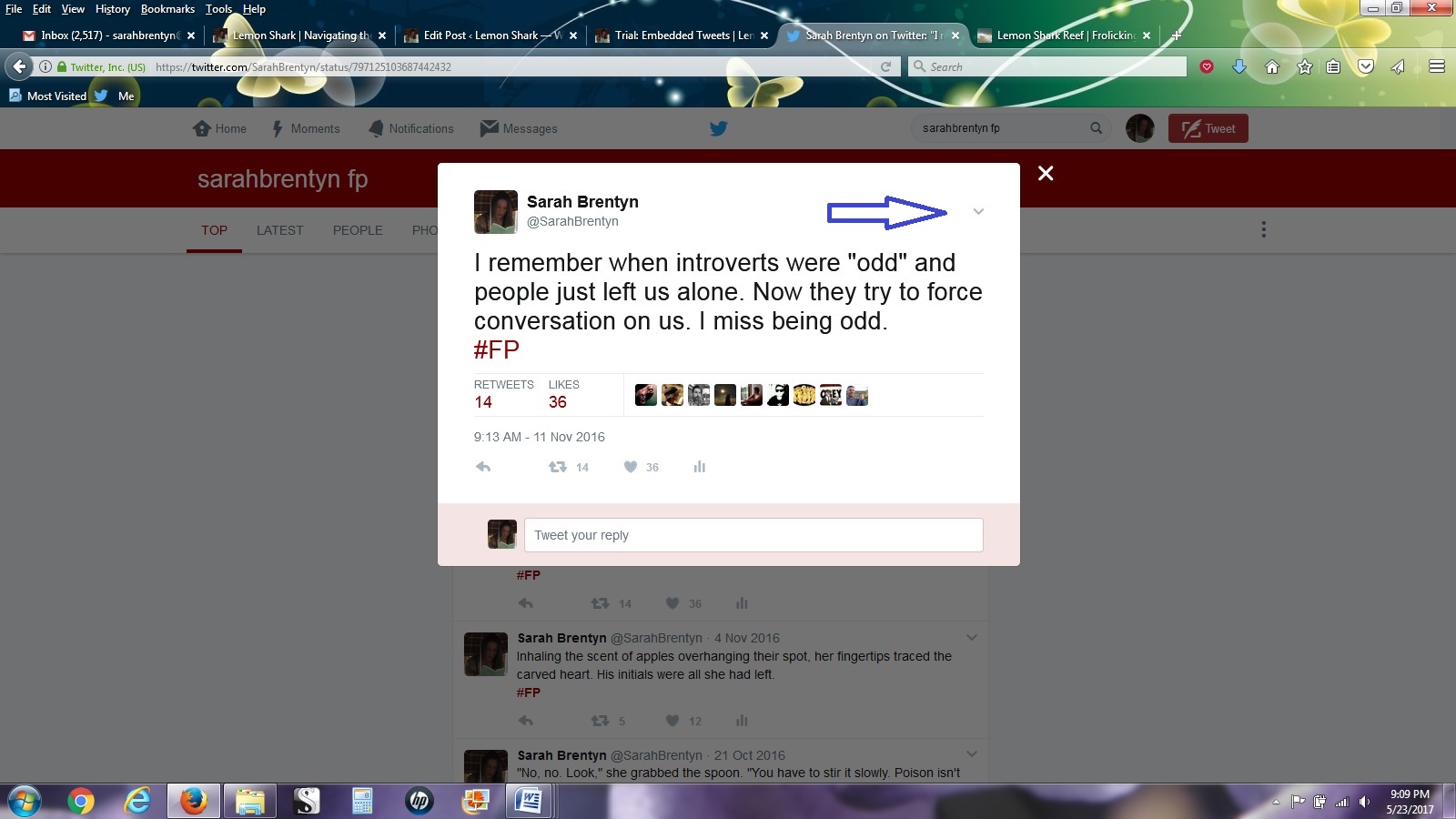 Click to enlarge
STEP TWO:
You’ll see a drop-down…
View original post 317 more words



Recent Comments