How Much Social Media Do Authors Really Need? (Guest Post by Janice Spina)
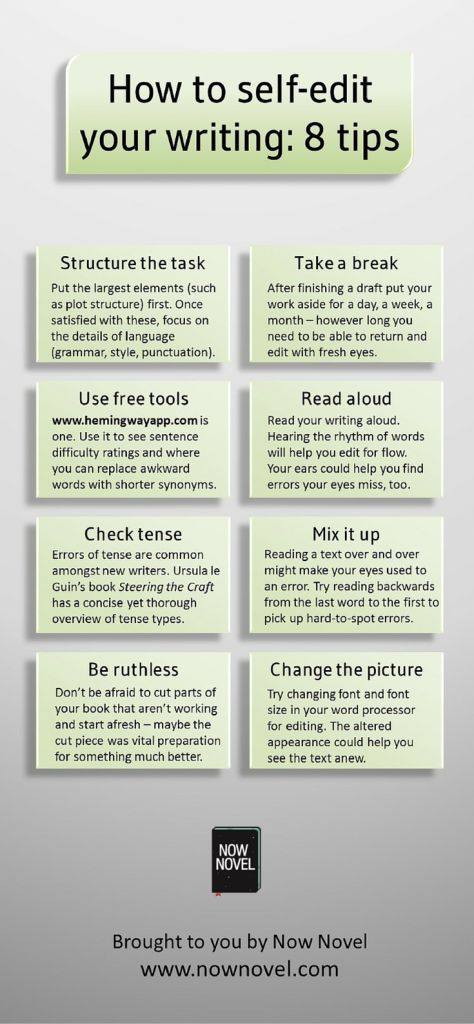
I’m not referring to a list of what matches what hanging in your closet.
 Or the hottest trends from InStyle Magazine.
See where I’m going? Finding these errors first is very important to presenting quality work to an editor that you’ve done some of your own redline editing.
 I call mine a cheat sheet. Some writers use an electronic file folder, others like Scrivener’s templates to help with character info to keep the story uniform.
But, now that I understand the importance of an actual Style Sheet is, I’m going to streamline the process…
View original post 256 more words
 Today on Write Better Fiction we’ll cover the Protagonist. Write Better Fiction is a process to help you critique your own manuscript and give yourself feedback. This will help you improve your novel, so you’re ready to submit it to an editor. Check the bottom of this post for links to previous Write Better Fiction articles.
Last week I wrote about Point Of View Goal. This week we’ll keep track of which scenes your protagonist is in.
The spreadsheet has a column for who is the point of view character in a scene, but we also need a column for your protagonist if you write from multiple points of view. If you write from a single point of view, your protagonists POV, throughout the novel, then you don’t need this column.

This column is easy. All you have to do is put the protagonists name in the row where…
View original post 351 more words
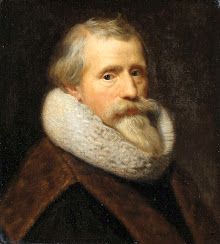 Paulus Moreelse self-portrait from the Rijksmuseum
I needed an image of a Renaissance self portrait for a recent post on my blog, but having made an expensive mistake once, I’ve become hyper vigilant about sourcing free images.
In my search for digital images I could use free and clear, I made two discoveries worth sharing. First, I stumbled across Open Culture, which proclaims to be “the best free cultural and educational media on the web.” There, I found links to over twenty world-famous museums that make images of their collections available on-line.
 Museum in Valencia, Spain. Photo by Margit Wallnery via pixabay.
Essentially, it’s possible to see a significant portion of the world’s great art with the ease of a few keystrokes. While this isn’t the same as visiting the Museum of New Zealand in person, for those of us in North America, it’s a lot cheaper…
View original post 347 more words
Source: The 100 Best Websites for Writers in 2016 (Link)
Maybe. That’s the short answer.
Me? I think printing with both distributors is the way to go.
But please for the love of God, I hope you can avoid some of my mistakes. Although, I didn’t crash and burn, I did bang up my poor little book a bit along the road to self-publishing. This was not a happy trip.
 Sheesh, I’m a slow learner sometimes. Hopefully, you will benefit from my mistakes.
CreateSpace provides an easy to use MS Word template for you to set up your book.

CreateSpace provides a free ISBN number for both your print…
View original post 529 more words
Source: NEW: Share a Kindle Instant Preview
Source: 3 Tips for Writing Heavy Emotional Scenes





Recent Comments